


Secure Data Vault
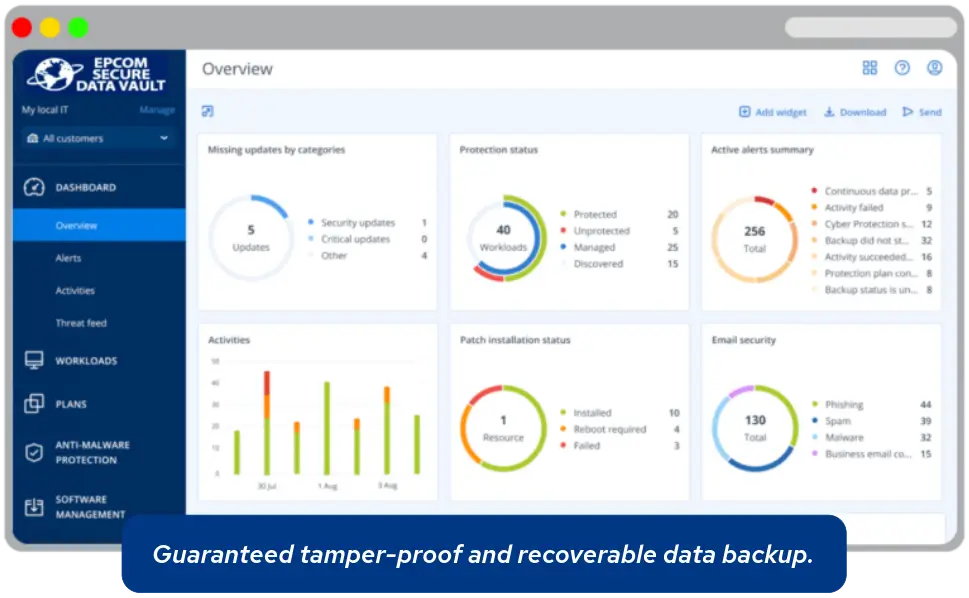
Epcom Secure Data Vault offers backup and recovery, ransomware or quantum cryptography protection, anti-malware, and vulnerability assessment, all managed through a single, intuitive platform.
-
Accidental Deletion Protection
-
Malware and Wiper Protection
-
Ransomware Protection
-
Quantum-Resistant Protection
-
Cloud Backup
-
Local Backup
What is Epcom Secure Data Vault?
Epcom Secure Data Vault is a unified data resilience platform that combines immutable backups, rapid recovery orchestration, and AI-aided threat detection and response to provide a complete end-to-end defense for critical workloads, regulatory compliance, and business continuity. It integrates with existing infrastructure with real-time granular visibility into errors and threats from endpoints to backup destinations and tools for rapid incident response.
Reliable backup and protection across all types of virtual and on-premise workloads, applications, and systems.

PCs
Servers
Databases

NAS Arrays
Hosting Accounts

Websites

Storefronts

Web Apps

SaaS

Development

3-2-1-1-0 BACKUP RULE
FOR DATA RESILIENCE
This proven data protection method is the baseline for Epcom Secure Data Vault’s data resilience strategy and takes it a step further with Geo Redundancy options to distribute backups across multiple locations and rapid restoration services from verified recovery points to accelerate recovery times and minimize downtime.
3
TOTAL COPIES

1 original and 2 backup copies
2
MEDIA TYPES

1 local and 1 cloud backup copy
1
OFFSITE COPY

1 local onsite backup copy for natural disasters
1
IMMUTABLE
1 offline immutable backup copy for ransomware protection
0
ERRORS

0 errors on restoration of verified backup copies
MODES
For Governance
Preserve backups for a defined retention period after being deleted by automated cleanup settings or manual user deletions.
For Compliance
Meant for regulatory requirements, does not allow changes and applies permanent retention when selected.
CYBERTHREAT DEFENSE
Real-time threat monitoring and rapid containment.
Immutable Backup
Locks backup files in secure, tamper-proof storage, preventing modification or deletion even if malware reaches backup systems.
AI-aided Protection
Detects and blocks emerging threat variants before they can access, steal, or encrypt data, complementing ironclad defenses for continuous protection, preventing exposure and vulnerability.
Rapid Restoration
Automates restore workflows and instant VM recoveries during disruptions, enabling business continuity with minimal to no downtime and data loss.

Epcom Secure Data Vault
Tamper-proof data protection from accidental deletions, ransomware, and hardware failures, making sure that files, databases, and virtual machines are retrievable.
Backup
Basic
full image backup-
1 Machine
-
Full Image Backup
-
Active Disk Cloning
-
Quick Recovery
-
Ransomware Blocker
-
Cryptomining Blocker
-
Vulnerability Assessment
-
Upgrade Discounts
Standard
full image backup-
1 Machine
-
Full Image Backup
-
250 GB Free
-
Active Disk Cloning
-
Quick Recovery
-
Ransomware Blocker
-
Cryptomining Blocker
-
Vulnerability Assessment
-
Cloud Backup Storage
-
End-to-End Encryption
-
Free Upgrades
Advanced
full image backup-
1 Machine
-
Full Image Backup
-
500 GB Free
-
Active Disk Cloning
-
Quick Recovery
-
Ransomware Blocker
-
Cryptomining Blocker
-
Vulnerability Assessment
-
Cloud Backup Storage
-
End-to-End Encryption
-
Free Upgrades
Backup + Protection
Basic
full image backup-
1 Machine
-
Full Image Backup
-
250 GB Free
-
Active Disk Cloning
-
Safe Recovery
-
Ransomware Blocker
-
Cryptomining Blocker
-
Vulnerability Assessment
-
Antivirus and Anti-malware
-
Remote Device Wipe
-
Continuous Data Protection
-
Drive Health Monitoring
-
Forensic Data Backup
-
Free Upgrades
Standard
full image backup-
1 Machine
-
Full Image Backup
-
500 GB Free
-
Active Disk Cloning
-
Safe Recovery
-
Ransomware Blocker
-
Cryptomining Blocker
-
Vulnerability Assessment
-
Cloud Backup Storage
-
End-to-End Encryption
-
Antivirus and Anti-malware
-
Remote Device Wipe
-
Continuous Data Protection
-
Drive Health Monitoring
-
Forensic Data Backup
-
Backup Anti-malware Scanning
-
Free Upgrades
Advanced
full image backup-
1 Machine
-
Full Image Backup
-
1 TB Free
-
Active Disk Cloning
-
Safe Recovery
-
Ransomware Blocker
-
Cryptomining Blocker
-
Vulnerability Assessment
-
Cloud Backup Storage
-
End-to-End Encryption
-
Antivirus and Anti-malware
-
Remote Device Wipe
-
Continuous Data Protection
-
Drive Health Monitoring
-
Forensic Data Backup
-
Backup Anti-malware Scanning
-
Electronic Signatures on Files
-
Free Upgrades
Talk to a certified data resilience expert today.
Turn catastrophic data loss into a recoverable event and gain an advantage against modern adversaries.
Frequently Asked Questions
Epcom Hosting Services Secure Data Vault
What is ransomware and how does Secure Data Vault protect against it?
Combining immutable backups with regular backup schedules, air-gapped or logically isolated storage, strong access controls, and rapid recovery procedures enhances protection so that businesses can quickly recover data while reducing the risks of ransomware-induced disruptions.
What is quantum cryptography attacks and how does Secure Data Vault protect against it?
Quantum cryptography attacks refer to threats posed by quantum computers that can break widely used public-key algorithms (such as RSA and ECC) by running quantum algorithms like Shor’s, or that exploit weaknesses in cryptographic implementations and key distribution, undermining confidentiality and integrity of stored or transmitted data. Secure Data Vault creates tamper-proof, write-once storage snapshots that cannot be altered or deleted by an attacker, making sure that a secure, unmodified copy of data remains available for recovery, and enabling organizations to restore systems to a pre-attack state and strengthen protection against quantum-resistant algorithms.
How long should backups be immutable?
Determining how long backups should be immutable depends on regulatory, legal, and business requirements: short-term immutability (e.g., 30–90 days) helps protect against ransomware and administrative errors, while mid-term retention (1–7 years) often satisfies financial, compliance, and audit needs, and long-term or indefinite immutability may be required for legal reasons. It is good practice to periodically review retention policies against changing laws and business needs; when in doubt, consult your legal counsel and compliance professional to set a minimum immutability duration for all data classes.
Are immutable backups safe from all types of attacks?